About Superhuman Mail
Superhuman Mail is the most productive email app ever made. Designed to help you fly through your inbox, be more responsive to what matters most, and collaborate faster than ever before, Superhuman Mail helps teams on...
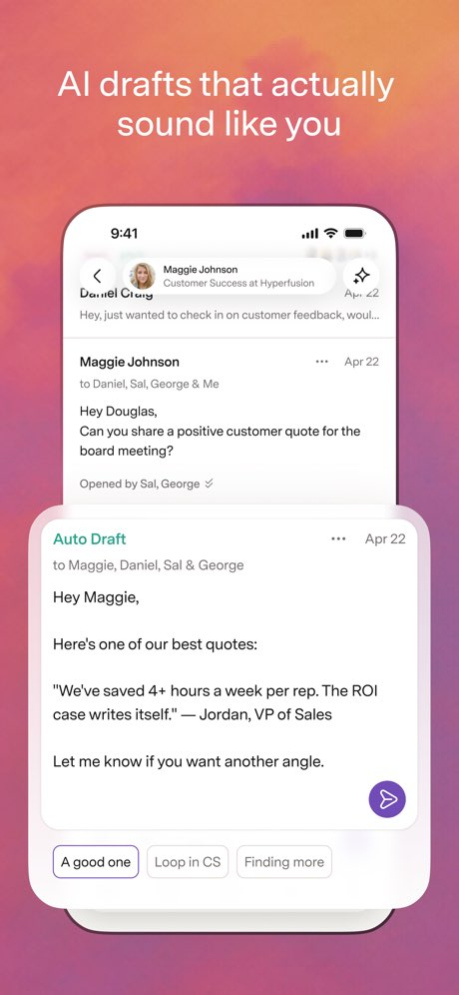
Superhuman Mail is the most productive email app ever made. Designed to help you fly through your inbox, be more responsive to what matters most, and collaborate faster than ever before, Superhuman Mail helps teams on Gmail and Outlook save 4+ hours per person each week. FLY THROUGH YOUR INBOX 2X FASTER Write better and faster with AI that matches your unique style for each person. Get draft replies on every email that needs a response, ready to edit and send. Turn your thoughts into polished emails in seconds with Write with Voice. Stay a step ahead with an automatic 1-line summary above every conversation. Automate phrases and entire emails with Snippets. BE MORE RESPONSIVE TO WHAT MATTERS MOST Automatically triage incoming email with customizable inbox splits, so you can always focus on what matters most. Avoid the clutter for good with Auto Archive. Never let a follow-up slip, with automatic reminders to reply. Send emails when they're most likely to be opened, so you land at the top of your recipient's inbox at just the right time. COLLABORATE FASTER THAN EVER BEFORE Share a live view of any email, and add comments for your team-no need to repeatedly screenshot, forward, or bcc. See your calendar without leaving your inbox. Get full context on your customers and deals with HubSpot and Salesforce directly integrated. Connect all your Gmail and Outlook accounts to AI tools like Claude and ChatGPT via the Superhuman Mail MCP. Teams save 20 million hours every single year with Superhuman Mail. https://superhuman.com/terms
Version History Prefer a more compact inbox? You can now choose from Normal, Condensed, and Minimal views. Just head to Settings and tap Inbox Density. 5.5.0 1d ago New: React to comments with emoji! Not every comment needs a reply. Now, you can react to any Team Comment with a quick emoji to weigh in or say thanks. Long-press on a comment, then tap one of the suggested emoji or tap the reaction icon to open the full picker. 5.4.0 Sep 28 Your Split Inboxes now sit at the top of the side menu, so they’re all one tap closer. Plus bug fixes and improvements. 5.3.0 Sep 22 Tweaks and fixes for our brand new mobile design. We're still dialing it in, so tell us what you think — two-finger tap anywhere for Superhuman Command, then type "feedback". 5.2.0 Sep 8 Tweaks, fixes, and improvements to our new mobile design. Got feedback? We'd love to hear it! Two-finger tap anywhere for Superhuman Command, then type "feedback". 5.1.0 Sep 4 New: everything! A complete mobile redesign, built from speaking with thousands of customers. Everything important is now one tap away, writing feels effortless, and every interaction is blazingly fast. - A persistent navigation bar so you can switch instantly between your inbox, calendar, and search. - Writing emails and replying now feel the same: fast, minimal, and beautiful. - Write with Voice and Write with AI are twice as fast. Turn thoughts into polished email in seconds. - We've added new shortcuts. Tap the Mail tab to jump to the top of a Split or back to Important. - Built for Liquid Glass with larger fonts, higher contrast, and warmer colors. 5.0.0 Sep 1 Bug fixes and improvements. Superhuman Mail is faster than a toddler racing to push the elevator button. 4.82.0 Aug 17 Bug fixes and improvements. Superhuman Mail is as polished as a pair of wedding shoes. 4.81.0 Aug 10 Superhuman Mail is as precise as a Formula One pit stop, thanks to our latest improvements. 4.80.0 Jul 20 Bug fixes and improvements. Superhuman Mail is blazingly fast. 4.79.0 Jul 13 Bug fixes and improvements. Superhuman Mail is as dialed in as sound check at Carnegie Hall. 4.78.0 Jul 1 New on iOS: Multi-day calendar views! We’ve added two- and three-day views plus monthly navigation, so you can easily see what’s coming up and plan ahead. To switch between them, just tap the rectangular icon on the top right of your calendar. 4.77.0 Jun 22 Superhuman Mail is blazingly fast, thanks to our latest bug fixes and improvements. 4.76.0 Jun 15 Quality improvements. Superhuman Mail is crisper than a pitch day shirt. 4.75.0 Jun 8 Bug fixes and improvements. Superhuman Mail is more refined than a perfumer's nose. 4.74.0 Jun 1 Drafts created in Gmail and Outlook now sync with Superhuman Mail — so your executive assistant and AI agents can draft in Gmail or Outlook, while you review and send in Superhuman Mail. (To let your AI agents fully drive Superhuman Mail, check out the Superhuman Mail MCP.) Plus a major speed boost: Write with Voice now creates drafts twice as fast as before! Just tap the voice icon and outline your email, and we'll write a polished draft that sounds like you. 4.73.0 May 26 Bug fixes and improvements. Superhuman Mail is sharper than a type designer's eye for kerning. 4.72.0 May 18 You can now respond straight from a notification with Quick Reply. Just long-tap, respond, and move on. Stay in flow and keep your inbox moving. 4.71.0 May 11 Bug fixes and improvements. Superhuman Mail is as crisp as a three-star chef's whites. 4.70.0 May 4 Bug fixes and improvements. Superhuman Mail is sharper than a chef's favorite knife. 4.69.0 Apr 27 New: Write with Voice is on mobile! Speaking is 3–4x faster than typing, so now you can simply say what you want to write and we’ll turn it into a polished draft in your tone. What used to take minutes can now be done in seconds. Instead of simply transcribing your words, Write with Voice transforms your ideas into a refined message that sounds like you. To get started: - Compose or reply to a message - Tap the voice icon in the bottom tray - Speak naturally — no need to be precise - Review and send your drafted message The first time you use Write with Voice, you’ll be prompted to enable microphone permissions. 4.68.0 Apr 20 Bug fixes and improvements. Superhuman Mail is as sharp as a bike courier through rush hour traffic. 4.67.0 Apr 14 Introducing the Superhuman Mail Calendar Widget for iOS! Other calendar widgets can be confusing: events with different durations look the same, overlaps aren’t clear, and you can't even tell what's happening right now or when your next break is. With our timeline view, you can see: - How long events are, and whether they overlap - What’s happening now, and how much time is left - Whether you get a break between meetings - All of this detail, even in the smallest widget Unlike the Google and Outlook widgets, it works with both your Google and Microsoft calendars. And if you're lucky enough to have a relaxed calendar, we have an agenda view as well. To add our widget: touch and hold your Home Screen background until the icons jiggle, tap Edit in the top-left, tap Add Widget, then search for Superhuman. Not seeing it? Make sure you’re on iOS 18.1 or newer. 4.66.0 Apr 6 Bug fixes and improvements. Superhuman Mail is as in sync as a jazz quintet trading solos. 4.65.0 Mar 31 Bug fixes and improvements. Superhuman Mail is crisper than a sommelier's pour. 4.64.0 Mar 23
Previous Versions
Here you can find the changelog of Superhuman Mail since it was posted on our website on 2021-12-18 09:14:20.
The latest version is 5.5.0 and it was updated on 2026-10-07 07:13:20. See below the changes in each version.
Superhuman Mail version 5.5.0
Updated At: 2026-10-06
Changes: Version History Prefer a more compact inbox? You can now choose from Normal, Condensed, and Minimal views. Just head to Settings and tap Inbox Density. 5.5.0 1d ago New: React to comments with emoji!
Not every comment needs a reply. Now, you can react to any Team Comment with a quick emoji to weigh in or say thanks.
Long-press on a comment, then tap one of the suggested emoji or tap the reaction icon to open the full picker. 5.4.0 Sep 28 Your Split Inboxes now sit at the top of the side menu, so they’re all one tap closer. Plus bug fixes and improvements. 5.3.0 Sep 22 Tweaks and fixes for our brand new mobile design. We're still dialing it in, so tell us what you think — two-finger tap anywhere for Superhuman Command, then type "feedback". 5.2.0 Sep 8 Tweaks, fixes, and improvements to our new mobile design. Got feedback? We'd love to hear it! Two-finger tap anywhere for Superhuman Command, then type "feedback". 5.1.0 Sep 4 New: everything! A complete mobile redesign, built from speaking with thousands of customers. Everything important is now one tap away, writing feels effortless, and every interaction is blazingly fast.
- A persistent navigation bar so you can switch instantly between your inbox, calendar, and search.
- Writing emails and replying now feel the same: fast, minimal, and beautiful.
- Write with Voice and Write with AI are twice as fast. Turn thoughts into polished email in seconds.
- We've added new shortcuts. Tap the Mail tab to jump to the top of a Split or back to Important.
- Built for Liquid Glass with larger fonts, higher contrast, and warmer colors. 5.0.0 Sep 1 Bug fixes and improvements. Superhuman Mail is faster than a toddler racing to push the elevator button. 4.82.0 Aug 17 Bug fixes and improvements. Superhuman Mail is as polished as a pair of wedding shoes. 4.81.0 Aug 10 Superhuman Mail is as precise as a Formula One pit stop, thanks to our latest improvements. 4.80.0 Jul 20 Bug fixes and improvements. Superhuman Mail is blazingly fast. 4.79.0 Jul 13 Bug fixes and improvements. Superhuman Mail is as dialed in as sound check at Carnegie Hall. 4.78.0 Jul 1 New on iOS: Multi-day calendar views! We’ve added two- and three-day views plus monthly navigation, so you can easily see what’s coming up and plan ahead. To switch between them, just tap the rectangular icon on the top right of your calendar. 4.77.0 Jun 22 Superhuman Mail is blazingly fast, thanks to our latest bug fixes and improvements. 4.76.0 Jun 15 Quality improvements. Superhuman Mail is crisper than a pitch day shirt. 4.75.0 Jun 8 Bug fixes and improvements. Superhuman Mail is more refined than a perfumer's nose. 4.74.0 Jun 1 Drafts created in Gmail and Outlook now sync with Superhuman Mail — so your executive assistant and AI agents can draft in Gmail or Outlook, while you review and send in Superhuman Mail. (To let your AI agents fully drive Superhuman Mail, check out the Superhuman Mail MCP.)
Plus a major speed boost: Write with Voice now creates drafts twice as fast as before! Just tap the voice icon and outline your email, and we'll write a polished draft that sounds like you. 4.73.0 May 26 Bug fixes and improvements. Superhuman Mail is sharper than a type designer's eye for kerning. 4.72.0 May 18 You can now respond straight from a notification with Quick Reply. Just long-tap, respond, and move on. Stay in flow and keep your inbox moving. 4.71.0 May 11 Bug fixes and improvements. Superhuman Mail is as crisp as a three-star chef's whites. 4.70.0 May 4 Bug fixes and improvements. Superhuman Mail is sharper than a chef's favorite knife. 4.69.0 Apr 27 New: Write with Voice is on mobile!
Speaking is 3–4x faster than typing, so now you can simply say what you want to write and we’ll turn it into a polished draft in your tone. What used to take minutes can now be done in seconds. Instead of simply transcribing your words, Write with Voice transforms your ideas into a refined message that sounds like you.
To get started:
- Compose or reply to a message
- Tap the voice icon in the bottom tray
- Speak naturally — no need to be precise
- Review and send your drafted message
The first time you use Write with Voice, you’ll be prompted to enable microphone permissions. 4.68.0 Apr 20 Bug fixes and improvements. Superhuman Mail is as sharp as a bike courier through rush hour traffic. 4.67.0 Apr 14 Introducing the Superhuman Mail Calendar Widget for iOS! Other calendar widgets can be confusing: events with different durations look the same, overlaps aren’t clear, and you can't even tell what's happening right now or when your next break is.
With our timeline view, you can see:
- How long events are, and whether they overlap
- What’s happening now, and how much time is left
- Whether you get a break between meetings
- All of this detail, even in the smallest widget
Unlike the Google and Outlook widgets, it works with both your Google and Microsoft calendars. And if you're lucky enough to have a relaxed calendar, we have an agenda view as well.
To add our widget: touch and hold your Home Screen background until the icons jiggle, tap Edit in the top-left, tap Add Widget, then search for Superhuman. Not seeing it? Make sure you’re on iOS 18.1 or newer. 4.66.0 Apr 6 Bug fixes and improvements. Superhuman Mail is as in sync as a jazz quintet trading solos. 4.65.0 Mar 31 Bug fixes and improvements. Superhuman Mail is crisper than a sommelier's pour. 4.64.0 Mar 23
Superhuman Mail version 5.4.0
Updated At: 2026-10-03
Changes: Version History New: React to comments with emoji!
Not every comment needs a reply. Now, you can react to any Team Comment with a quick emoji to weigh in or say thanks.
Long-press on a comment, then tap one of the suggested emoji or tap the reaction icon to open the full picker. 5.4.0 4d ago Your Split Inboxes now sit at the top of the side menu, so they’re all one tap closer. Plus bug fixes and improvements. 5.3.0 Sep 22 Tweaks and fixes for our brand new mobile design. We're still dialing it in, so tell us what you think — two-finger tap anywhere for Superhuman Command, then type "feedback". 5.2.0 Sep 8 Tweaks, fixes, and improvements to our new mobile design. Got feedback? We'd love to hear it! Two-finger tap anywhere for Superhuman Command, then type "feedback". 5.1.0 Sep 4 New: everything! A complete mobile redesign, built from speaking with thousands of customers. Everything important is now one tap away, writing feels effortless, and every interaction is blazingly fast.
- A persistent navigation bar so you can switch instantly between your inbox, calendar, and search.
- Writing emails and replying now feel the same: fast, minimal, and beautiful.
- Write with Voice and Write with AI are twice as fast. Turn thoughts into polished email in seconds.
- We've added new shortcuts. Tap the Mail tab to jump to the top of a Split or back to Important.
- Built for Liquid Glass with larger fonts, higher contrast, and warmer colors. 5.0.0 Sep 1 Bug fixes and improvements. Superhuman Mail is faster than a toddler racing to push the elevator button. 4.82.0 Aug 17 Bug fixes and improvements. Superhuman Mail is as polished as a pair of wedding shoes. 4.81.0 Aug 10 Superhuman Mail is as precise as a Formula One pit stop, thanks to our latest improvements. 4.80.0 Jul 20 Bug fixes and improvements. Superhuman Mail is blazingly fast. 4.79.0 Jul 13 Bug fixes and improvements. Superhuman Mail is as dialed in as sound check at Carnegie Hall. 4.78.0 Jul 1 New on iOS: Multi-day calendar views! We’ve added two- and three-day views plus monthly navigation, so you can easily see what’s coming up and plan ahead. To switch between them, just tap the rectangular icon on the top right of your calendar. 4.77.0 Jun 22 Superhuman Mail is blazingly fast, thanks to our latest bug fixes and improvements. 4.76.0 Jun 15 Quality improvements. Superhuman Mail is crisper than a pitch day shirt. 4.75.0 Jun 8 Bug fixes and improvements. Superhuman Mail is more refined than a perfumer's nose. 4.74.0 Jun 1 Drafts created in Gmail and Outlook now sync with Superhuman Mail — so your executive assistant and AI agents can draft in Gmail or Outlook, while you review and send in Superhuman Mail. (To let your AI agents fully drive Superhuman Mail, check out the Superhuman Mail MCP.)
Plus a major speed boost: Write with Voice now creates drafts twice as fast as before! Just tap the voice icon and outline your email, and we'll write a polished draft that sounds like you. 4.73.0 May 26 Bug fixes and improvements. Superhuman Mail is sharper than a type designer's eye for kerning. 4.72.0 May 18 You can now respond straight from a notification with Quick Reply. Just long-tap, respond, and move on. Stay in flow and keep your inbox moving. 4.71.0 May 11 Bug fixes and improvements. Superhuman Mail is as crisp as a three-star chef's whites. 4.70.0 May 4 Bug fixes and improvements. Superhuman Mail is sharper than a chef's favorite knife. 4.69.0 Apr 27 New: Write with Voice is on mobile!
Speaking is 3–4x faster than typing, so now you can simply say what you want to write and we’ll turn it into a polished draft in your tone. What used to take minutes can now be done in seconds. Instead of simply transcribing your words, Write with Voice transforms your ideas into a refined message that sounds like you.
To get started:
- Compose or reply to a message
- Tap the voice icon in the bottom tray
- Speak naturally — no need to be precise
- Review and send your drafted message
The first time you use Write with Voice, you’ll be prompted to enable microphone permissions. 4.68.0 Apr 20 Bug fixes and improvements. Superhuman Mail is as sharp as a bike courier through rush hour traffic. 4.67.0 Apr 14 Introducing the Superhuman Mail Calendar Widget for iOS! Other calendar widgets can be confusing: events with different durations look the same, overlaps aren’t clear, and you can't even tell what's happening right now or when your next break is.
With our timeline view, you can see:
- How long events are, and whether they overlap
- What’s happening now, and how much time is left
- Whether you get a break between meetings
- All of this detail, even in the smallest widget
Unlike the Google and Outlook widgets, it works with both your Google and Microsoft calendars. And if you're lucky enough to have a relaxed calendar, we have an agenda view as well.
To add our widget: touch and hold your Home Screen background until the icons jiggle, tap Edit in the top-left, tap Add Widget, then search for Superhuman. Not seeing it? Make sure you’re on iOS 18.1 or newer. 4.66.0 Apr 6 Bug fixes and improvements. Superhuman Mail is as in sync as a jazz quintet trading solos. 4.65.0 Mar 31 Bug fixes and improvements. Superhuman Mail is crisper than a sommelier's pour. 4.64.0 Mar 23 Bug fixes and improvements. Superhuman Mail is tighter than a session drummer's hi-hat. 4.63.0 Mar 16
Superhuman Mail version 5.3.0
Updated At: 2026-09-26
Changes: Version History Your Split Inboxes now sit at the top of the side menu, so they’re all one tap closer. Plus bug fixes and improvements. 5.3.0 3d ago Tweaks and fixes for our brand new mobile design. We're still dialing it in, so tell us what you think — two-finger tap anywhere for Superhuman Command, then type "feedback". 5.2.0 Sep 8 Tweaks, fixes, and improvements to our new mobile design. Got feedback? We'd love to hear it! Two-finger tap anywhere for Superhuman Command, then type "feedback". 5.1.0 Sep 4 New: everything! A complete mobile redesign, built from speaking with thousands of customers. Everything important is now one tap away, writing feels effortless, and every interaction is blazingly fast.
- A persistent navigation bar so you can switch instantly between your inbox, calendar, and search.
- Writing emails and replying now feel the same: fast, minimal, and beautiful.
- Write with Voice and Write with AI are twice as fast. Turn thoughts into polished email in seconds.
- We've added new shortcuts. Tap the Mail tab to jump to the top of a Split or back to Important.
- Built for Liquid Glass with larger fonts, higher contrast, and warmer colors. 5.0.0 Sep 1 Bug fixes and improvements. Superhuman Mail is faster than a toddler racing to push the elevator button. 4.82.0 Aug 17 Bug fixes and improvements. Superhuman Mail is as polished as a pair of wedding shoes. 4.81.0 Aug 10 Superhuman Mail is as precise as a Formula One pit stop, thanks to our latest improvements. 4.80.0 Jul 20 Bug fixes and improvements. Superhuman Mail is blazingly fast. 4.79.0 Jul 13 Bug fixes and improvements. Superhuman Mail is as dialed in as sound check at Carnegie Hall. 4.78.0 Jul 1 New on iOS: Multi-day calendar views! We’ve added two- and three-day views plus monthly navigation, so you can easily see what’s coming up and plan ahead. To switch between them, just tap the rectangular icon on the top right of your calendar. 4.77.0 Jun 22 Superhuman Mail is blazingly fast, thanks to our latest bug fixes and improvements. 4.76.0 Jun 15 Quality improvements. Superhuman Mail is crisper than a pitch day shirt. 4.75.0 Jun 8 Bug fixes and improvements. Superhuman Mail is more refined than a perfumer's nose. 4.74.0 Jun 1 Drafts created in Gmail and Outlook now sync with Superhuman Mail — so your executive assistant and AI agents can draft in Gmail or Outlook, while you review and send in Superhuman Mail. (To let your AI agents fully drive Superhuman Mail, check out the Superhuman Mail MCP.)
Plus a major speed boost: Write with Voice now creates drafts twice as fast as before! Just tap the voice icon and outline your email, and we'll write a polished draft that sounds like you. 4.73.0 May 26 Bug fixes and improvements. Superhuman Mail is sharper than a type designer's eye for kerning. 4.72.0 May 18 You can now respond straight from a notification with Quick Reply. Just long-tap, respond, and move on. Stay in flow and keep your inbox moving. 4.71.0 May 11 Bug fixes and improvements. Superhuman Mail is as crisp as a three-star chef's whites. 4.70.0 May 4 Bug fixes and improvements. Superhuman Mail is sharper than a chef's favorite knife. 4.69.0 Apr 27 New: Write with Voice is on mobile!
Speaking is 3–4x faster than typing, so now you can simply say what you want to write and we’ll turn it into a polished draft in your tone. What used to take minutes can now be done in seconds. Instead of simply transcribing your words, Write with Voice transforms your ideas into a refined message that sounds like you.
To get started:
- Compose or reply to a message
- Tap the voice icon in the bottom tray
- Speak naturally — no need to be precise
- Review and send your drafted message
The first time you use Write with Voice, you’ll be prompted to enable microphone permissions. 4.68.0 Apr 20 Bug fixes and improvements. Superhuman Mail is as sharp as a bike courier through rush hour traffic. 4.67.0 Apr 14 Introducing the Superhuman Mail Calendar Widget for iOS! Other calendar widgets can be confusing: events with different durations look the same, overlaps aren’t clear, and you can't even tell what's happening right now or when your next break is.
With our timeline view, you can see:
- How long events are, and whether they overlap
- What’s happening now, and how much time is left
- Whether you get a break between meetings
- All of this detail, even in the smallest widget
Unlike the Google and Outlook widgets, it works with both your Google and Microsoft calendars. And if you're lucky enough to have a relaxed calendar, we have an agenda view as well.
To add our widget: touch and hold your Home Screen background until the icons jiggle, tap Edit in the top-left, tap Add Widget, then search for Superhuman. Not seeing it? Make sure you’re on iOS 18.1 or newer. 4.66.0 Apr 6 Bug fixes and improvements. Superhuman Mail is as in sync as a jazz quintet trading solos. 4.65.0 Mar 31 Bug fixes and improvements. Superhuman Mail is crisper than a sommelier's pour. 4.64.0 Mar 23 Bug fixes and improvements. Superhuman Mail is tighter than a session drummer's hi-hat. 4.63.0 Mar 16 Bug fixes and improvements. Superhuman Mail is as sharp as an Oscars night tux. 4.62.0 Mar 12
Superhuman Mail version 5.2.0
Updated At: 2026-09-19
Changes: Version History Tweaks and fixes for our brand new mobile design. We're still dialing it in, so tell us what you think — two-finger tap anywhere for Superhuman Command, then type "feedback". 5.2.0 Sep 8 Tweaks, fixes, and improvements to our new mobile design. Got feedback? We'd love to hear it! Two-finger tap anywhere for Superhuman Command, then type "feedback". 5.1.0 Sep 4 New: everything! A complete mobile redesign, built from speaking with thousands of customers. Everything important is now one tap away, writing feels effortless, and every interaction is blazingly fast.
- A persistent navigation bar so you can switch instantly between your inbox, calendar, and search.
- Writing emails and replying now feel the same: fast, minimal, and beautiful.
- Write with Voice and Write with AI are twice as fast. Turn thoughts into polished email in seconds.
- We've added new shortcuts. Tap the Mail tab to jump to the top of a Split or back to Important.
- Built for Liquid Glass with larger fonts, higher contrast, and warmer colors. 5.0.0 Sep 1 Bug fixes and improvements. Superhuman Mail is faster than a toddler racing to push the elevator button. 4.82.0 Aug 17 Bug fixes and improvements. Superhuman Mail is as polished as a pair of wedding shoes. 4.81.0 Aug 10 Superhuman Mail is as precise as a Formula One pit stop, thanks to our latest improvements. 4.80.0 Jul 20 Bug fixes and improvements. Superhuman Mail is blazingly fast. 4.79.0 Jul 13 Bug fixes and improvements. Superhuman Mail is as dialed in as sound check at Carnegie Hall. 4.78.0 Jul 1 New on iOS: Multi-day calendar views! We’ve added two- and three-day views plus monthly navigation, so you can easily see what’s coming up and plan ahead. To switch between them, just tap the rectangular icon on the top right of your calendar. 4.77.0 Jun 22 Superhuman Mail is blazingly fast, thanks to our latest bug fixes and improvements. 4.76.0 Jun 15 Quality improvements. Superhuman Mail is crisper than a pitch day shirt. 4.75.0 Jun 8 Bug fixes and improvements. Superhuman Mail is more refined than a perfumer's nose. 4.74.0 Jun 1 Drafts created in Gmail and Outlook now sync with Superhuman Mail — so your executive assistant and AI agents can draft in Gmail or Outlook, while you review and send in Superhuman Mail. (To let your AI agents fully drive Superhuman Mail, check out the Superhuman Mail MCP.)
Plus a major speed boost: Write with Voice now creates drafts twice as fast as before! Just tap the voice icon and outline your email, and we'll write a polished draft that sounds like you. 4.73.0 May 26 Bug fixes and improvements. Superhuman Mail is sharper than a type designer's eye for kerning. 4.72.0 May 18 You can now respond straight from a notification with Quick Reply. Just long-tap, respond, and move on. Stay in flow and keep your inbox moving. 4.71.0 May 11 Bug fixes and improvements. Superhuman Mail is as crisp as a three-star chef's whites. 4.70.0 May 4 Bug fixes and improvements. Superhuman Mail is sharper than a chef's favorite knife. 4.69.0 Apr 27 New: Write with Voice is on mobile!
Speaking is 3–4x faster than typing, so now you can simply say what you want to write and we’ll turn it into a polished draft in your tone. What used to take minutes can now be done in seconds. Instead of simply transcribing your words, Write with Voice transforms your ideas into a refined message that sounds like you.
To get started:
- Compose or reply to a message
- Tap the voice icon in the bottom tray
- Speak naturally — no need to be precise
- Review and send your drafted message
The first time you use Write with Voice, you’ll be prompted to enable microphone permissions. 4.68.0 Apr 20 Bug fixes and improvements. Superhuman Mail is as sharp as a bike courier through rush hour traffic. 4.67.0 Apr 14 Introducing the Superhuman Mail Calendar Widget for iOS! Other calendar widgets can be confusing: events with different durations look the same, overlaps aren’t clear, and you can't even tell what's happening right now or when your next break is.
With our timeline view, you can see:
- How long events are, and whether they overlap
- What’s happening now, and how much time is left
- Whether you get a break between meetings
- All of this detail, even in the smallest widget
Unlike the Google and Outlook widgets, it works with both your Google and Microsoft calendars. And if you're lucky enough to have a relaxed calendar, we have an agenda view as well.
To add our widget: touch and hold your Home Screen background until the icons jiggle, tap Edit in the top-left, tap Add Widget, then search for Superhuman. Not seeing it? Make sure you’re on iOS 18.1 or newer. 4.66.0 Apr 6 Bug fixes and improvements. Superhuman Mail is as in sync as a jazz quintet trading solos. 4.65.0 Mar 31 Bug fixes and improvements. Superhuman Mail is crisper than a sommelier's pour. 4.64.0 Mar 23 Bug fixes and improvements. Superhuman Mail is tighter than a session drummer's hi-hat. 4.63.0 Mar 16 Bug fixes and improvements. Superhuman Mail is as sharp as an Oscars night tux. 4.62.0 Mar 12 You can now long-press, drag, and drop to create a new calendar event. Easier for your thumb to find that perfect slot!
New events default to 30 minutes. To adjust the time, simply long-press on the circles and drag. 4.61.1 Mar 6
Superhuman Mail version 5.2.0
Updated At: 2026-09-12
Changes: Version History Tweaks and fixes for our brand new mobile design. We're still dialing it in, so tell us what you think — two-finger tap anywhere for Superhuman Command, then type "feedback". 5.2.0 3d ago Tweaks, fixes, and improvements to our new mobile design. Got feedback? We'd love to hear it! Two-finger tap anywhere for Superhuman Command, then type "feedback". 5.1.0 Sep 4 New: everything! A complete mobile redesign, built from speaking with thousands of customers. Everything important is now one tap away, writing feels effortless, and every interaction is blazingly fast.
- A persistent navigation bar so you can switch instantly between your inbox, calendar, and search.
- Writing emails and replying now feel the same: fast, minimal, and beautiful.
- Write with Voice and Write with AI are twice as fast. Turn thoughts into polished email in seconds.
- We've added new shortcuts. Tap the Mail tab to jump to the top of a Split or back to Important.
- Built for Liquid Glass with larger fonts, higher contrast, and warmer colors. 5.0.0 Sep 1 Bug fixes and improvements. Superhuman Mail is faster than a toddler racing to push the elevator button. 4.82.0 Aug 17 Bug fixes and improvements. Superhuman Mail is as polished as a pair of wedding shoes. 4.81.0 Aug 10 Superhuman Mail is as precise as a Formula One pit stop, thanks to our latest improvements. 4.80.0 Jul 20 Bug fixes and improvements. Superhuman Mail is blazingly fast. 4.79.0 Jul 13 Bug fixes and improvements. Superhuman Mail is as dialed in as sound check at Carnegie Hall. 4.78.0 Jul 1 New on iOS: Multi-day calendar views! We’ve added two- and three-day views plus monthly navigation, so you can easily see what’s coming up and plan ahead. To switch between them, just tap the rectangular icon on the top right of your calendar. 4.77.0 Jun 22 Superhuman Mail is blazingly fast, thanks to our latest bug fixes and improvements. 4.76.0 Jun 15 Quality improvements. Superhuman Mail is crisper than a pitch day shirt. 4.75.0 Jun 8 Bug fixes and improvements. Superhuman Mail is more refined than a perfumer's nose. 4.74.0 Jun 1 Drafts created in Gmail and Outlook now sync with Superhuman Mail — so your executive assistant and AI agents can draft in Gmail or Outlook, while you review and send in Superhuman Mail. (To let your AI agents fully drive Superhuman Mail, check out the Superhuman Mail MCP.)
Plus a major speed boost: Write with Voice now creates drafts twice as fast as before! Just tap the voice icon and outline your email, and we'll write a polished draft that sounds like you. 4.73.0 May 26 Bug fixes and improvements. Superhuman Mail is sharper than a type designer's eye for kerning. 4.72.0 May 18 You can now respond straight from a notification with Quick Reply. Just long-tap, respond, and move on. Stay in flow and keep your inbox moving. 4.71.0 May 11 Bug fixes and improvements. Superhuman Mail is as crisp as a three-star chef's whites. 4.70.0 May 4 Bug fixes and improvements. Superhuman Mail is sharper than a chef's favorite knife. 4.69.0 Apr 27 New: Write with Voice is on mobile!
Speaking is 3–4x faster than typing, so now you can simply say what you want to write and we’ll turn it into a polished draft in your tone. What used to take minutes can now be done in seconds. Instead of simply transcribing your words, Write with Voice transforms your ideas into a refined message that sounds like you.
To get started:
- Compose or reply to a message
- Tap the voice icon in the bottom tray
- Speak naturally — no need to be precise
- Review and send your drafted message
The first time you use Write with Voice, you’ll be prompted to enable microphone permissions. 4.68.0 Apr 20 Bug fixes and improvements. Superhuman Mail is as sharp as a bike courier through rush hour traffic. 4.67.0 Apr 14 Introducing the Superhuman Mail Calendar Widget for iOS! Other calendar widgets can be confusing: events with different durations look the same, overlaps aren’t clear, and you can't even tell what's happening right now or when your next break is.
With our timeline view, you can see:
- How long events are, and whether they overlap
- What’s happening now, and how much time is left
- Whether you get a break between meetings
- All of this detail, even in the smallest widget
Unlike the Google and Outlook widgets, it works with both your Google and Microsoft calendars. And if you're lucky enough to have a relaxed calendar, we have an agenda view as well.
To add our widget: touch and hold your Home Screen background until the icons jiggle, tap Edit in the top-left, tap Add Widget, then search for Superhuman. Not seeing it? Make sure you’re on iOS 18.1 or newer. 4.66.0 Apr 6 Bug fixes and improvements. Superhuman Mail is as in sync as a jazz quintet trading solos. 4.65.0 Mar 31 Bug fixes and improvements. Superhuman Mail is crisper than a sommelier's pour. 4.64.0 Mar 23 Bug fixes and improvements. Superhuman Mail is tighter than a session drummer's hi-hat. 4.63.0 Mar 16 Bug fixes and improvements. Superhuman Mail is as sharp as an Oscars night tux. 4.62.0 Mar 12 You can now long-press, drag, and drop to create a new calendar event. Easier for your thumb to find that perfect slot!
New events default to 30 minutes. To adjust the time, simply long-press on the circles and drag. 4.61.1 Mar 6
Superhuman Mail version 5.0.0
Updated At: 2026-09-05
Changes: Version History New: everything! A complete mobile redesign, built from speaking with thousands of customers. Everything important is now one tap away, writing feels effortless, and every interaction is blazingly fast.
- A persistent navigation bar so you can switch instantly between your inbox, calendar, and search.
- Writing emails and replying now feel the same: fast, minimal, and beautiful.
- Write with Voice and Write with AI are twice as fast. Turn thoughts into polished email in seconds.
- We've added new shortcuts. Tap the Mail tab to jump to the top of a Split or back to Important.
- Built for Liquid Glass with larger fonts, higher contrast, and warmer colors. 5.0.0 3d ago Bug fixes and improvements. Superhuman Mail is faster than a toddler racing to push the elevator button. 4.82.0 Aug 17 Bug fixes and improvements. Superhuman Mail is as polished as a pair of wedding shoes. 4.81.0 Aug 10 Superhuman Mail is as precise as a Formula One pit stop, thanks to our latest improvements. 4.80.0 Jul 20 Bug fixes and improvements. Superhuman Mail is blazingly fast. 4.79.0 Jul 13 Bug fixes and improvements. Superhuman Mail is as dialed in as sound check at Carnegie Hall. 4.78.0 Jul 1 New on iOS: Multi-day calendar views! We’ve added two- and three-day views plus monthly navigation, so you can easily see what’s coming up and plan ahead. To switch between them, just tap the rectangular icon on the top right of your calendar. 4.77.0 Jun 22 Superhuman Mail is blazingly fast, thanks to our latest bug fixes and improvements. 4.76.0 Jun 15 Quality improvements. Superhuman Mail is crisper than a pitch day shirt. 4.75.0 Jun 8 Bug fixes and improvements. Superhuman Mail is more refined than a perfumer's nose. 4.74.0 Jun 1 Drafts created in Gmail and Outlook now sync with Superhuman Mail — so your executive assistant and AI agents can draft in Gmail or Outlook, while you review and send in Superhuman Mail. (To let your AI agents fully drive Superhuman Mail, check out the Superhuman Mail MCP.)
Plus a major speed boost: Write with Voice now creates drafts twice as fast as before! Just tap the voice icon and outline your email, and we'll write a polished draft that sounds like you. 4.73.0 May 26 Bug fixes and improvements. Superhuman Mail is sharper than a type designer's eye for kerning. 4.72.0 May 18 You can now respond straight from a notification with Quick Reply. Just long-tap, respond, and move on. Stay in flow and keep your inbox moving. 4.71.0 May 11 Bug fixes and improvements. Superhuman Mail is as crisp as a three-star chef's whites. 4.70.0 May 4 Bug fixes and improvements. Superhuman Mail is sharper than a chef's favorite knife. 4.69.0 Apr 27 New: Write with Voice is on mobile!
Speaking is 3–4x faster than typing, so now you can simply say what you want to write and we’ll turn it into a polished draft in your tone. What used to take minutes can now be done in seconds. Instead of simply transcribing your words, Write with Voice transforms your ideas into a refined message that sounds like you.
To get started:
- Compose or reply to a message
- Tap the voice icon in the bottom tray
- Speak naturally — no need to be precise
- Review and send your drafted message
The first time you use Write with Voice, you’ll be prompted to enable microphone permissions. 4.68.0 Apr 20 Bug fixes and improvements. Superhuman Mail is as sharp as a bike courier through rush hour traffic. 4.67.0 Apr 14 Introducing the Superhuman Mail Calendar Widget for iOS! Other calendar widgets can be confusing: events with different durations look the same, overlaps aren’t clear, and you can't even tell what's happening right now or when your next break is.
With our timeline view, you can see:
- How long events are, and whether they overlap
- What’s happening now, and how much time is left
- Whether you get a break between meetings
- All of this detail, even in the smallest widget
Unlike the Google and Outlook widgets, it works with both your Google and Microsoft calendars. And if you're lucky enough to have a relaxed calendar, we have an agenda view as well.
To add our widget: touch and hold your Home Screen background until the icons jiggle, tap Edit in the top-left, tap Add Widget, then search for Superhuman. Not seeing it? Make sure you’re on iOS 18.1 or newer. 4.66.0 Apr 6 Bug fixes and improvements. Superhuman Mail is as in sync as a jazz quintet trading solos. 4.65.0 Mar 31 Bug fixes and improvements. Superhuman Mail is crisper than a sommelier's pour. 4.64.0 Mar 23 Bug fixes and improvements. Superhuman Mail is tighter than a session drummer's hi-hat. 4.63.0 Mar 16 Bug fixes and improvements. Superhuman Mail is as sharp as an Oscars night tux. 4.62.0 Mar 12 You can now long-press, drag, and drop to create a new calendar event. Easier for your thumb to find that perfect slot!
New events default to 30 minutes. To adjust the time, simply long-press on the circles and drag. 4.61.1 Mar 6 You can now long-press, drag, and drop to create a new calendar event. Easier for your thumb to find that perfect slot!
New events default to 30 minutes. To adjust the time, simply long-press on the circles and drag. 4.61.0 Mar 2 Spring cleaning: complete. Superhuman Mail is as immaculate as a freshly raked zen garden. 4.60.0 Feb 23
Superhuman Mail version 4.82.0
Updated At: 2026-08-24
Changes: Version History Bug fixes and improvements. Superhuman Mail is faster than a toddler racing to push the elevator button. 4.82.0 6d ago Bug fixes and improvements. Superhuman Mail is as polished as a pair of wedding shoes. 4.81.0 Aug 10 Superhuman Mail is as precise as a Formula One pit stop, thanks to our latest improvements. 4.80.0 Jul 20 Bug fixes and improvements. Superhuman Mail is blazingly fast. 4.79.0 Jul 13 Bug fixes and improvements. Superhuman Mail is as dialed in as sound check at Carnegie Hall. 4.78.0 Jul 1 New on iOS: Multi-day calendar views! We’ve added two- and three-day views plus monthly navigation, so you can easily see what’s coming up and plan ahead. To switch between them, just tap the rectangular icon on the top right of your calendar. 4.77.0 Jun 22 Superhuman Mail is blazingly fast, thanks to our latest bug fixes and improvements. 4.76.0 Jun 15 Quality improvements. Superhuman Mail is crisper than a pitch day shirt. 4.75.0 Jun 8 Bug fixes and improvements. Superhuman Mail is more refined than a perfumer's nose. 4.74.0 Jun 1 Drafts created in Gmail and Outlook now sync with Superhuman Mail — so your executive assistant and AI agents can draft in Gmail or Outlook, while you review and send in Superhuman Mail. (To let your AI agents fully drive Superhuman Mail, check out the Superhuman Mail MCP.)
Plus a major speed boost: Write with Voice now creates drafts twice as fast as before! Just tap the voice icon and outline your email, and we'll write a polished draft that sounds like you. 4.73.0 May 26 Bug fixes and improvements. Superhuman Mail is sharper than a type designer's eye for kerning. 4.72.0 May 18 You can now respond straight from a notification with Quick Reply. Just long-tap, respond, and move on. Stay in flow and keep your inbox moving. 4.71.0 May 11 Bug fixes and improvements. Superhuman Mail is as crisp as a three-star chef's whites. 4.70.0 May 4 Bug fixes and improvements. Superhuman Mail is sharper than a chef's favorite knife. 4.69.0 Apr 27 New: Write with Voice is on mobile!
Speaking is 3–4x faster than typing, so now you can simply say what you want to write and we’ll turn it into a polished draft in your tone. What used to take minutes can now be done in seconds. Instead of simply transcribing your words, Write with Voice transforms your ideas into a refined message that sounds like you.
To get started:
- Compose or reply to a message
- Tap the voice icon in the bottom tray
- Speak naturally — no need to be precise
- Review and send your drafted message
The first time you use Write with Voice, you’ll be prompted to enable microphone permissions. 4.68.0 Apr 20 Bug fixes and improvements. Superhuman Mail is as sharp as a bike courier through rush hour traffic. 4.67.0 Apr 14 Introducing the Superhuman Mail Calendar Widget for iOS! Other calendar widgets can be confusing: events with different durations look the same, overlaps aren’t clear, and you can't even tell what's happening right now or when your next break is.
With our timeline view, you can see:
- How long events are, and whether they overlap
- What’s happening now, and how much time is left
- Whether you get a break between meetings
- All of this detail, even in the smallest widget
Unlike the Google and Outlook widgets, it works with both your Google and Microsoft calendars. And if you're lucky enough to have a relaxed calendar, we have an agenda view as well.
To add our widget: touch and hold your Home Screen background until the icons jiggle, tap Edit in the top-left, tap Add Widget, then search for Superhuman. Not seeing it? Make sure you’re on iOS 18.1 or newer. 4.66.0 Apr 6 Bug fixes and improvements. Superhuman Mail is as in sync as a jazz quintet trading solos. 4.65.0 Mar 31 Bug fixes and improvements. Superhuman Mail is crisper than a sommelier's pour. 4.64.0 Mar 23 Bug fixes and improvements. Superhuman Mail is tighter than a session drummer's hi-hat. 4.63.0 Mar 16 Bug fixes and improvements. Superhuman Mail is as sharp as an Oscars night tux. 4.62.0 Mar 12 You can now long-press, drag, and drop to create a new calendar event. Easier for your thumb to find that perfect slot!
New events default to 30 minutes. To adjust the time, simply long-press on the circles and drag. 4.61.1 Mar 6 You can now long-press, drag, and drop to create a new calendar event. Easier for your thumb to find that perfect slot!
New events default to 30 minutes. To adjust the time, simply long-press on the circles and drag. 4.61.0 Mar 2 Spring cleaning: complete. Superhuman Mail is as immaculate as a freshly raked zen garden. 4.60.0 Feb 23 Our engineers got a head start on spring cleaning, with a flurry of improvements and fixes. 4.59.0 Feb 18
Superhuman Mail version 4.80.0
Updated At: 2026-08-05
Changes: Version History Superhuman Mail is as precise as a Formula One pit stop, thanks to our latest improvements. 4.80.0 Jul 20 Bug fixes and improvements. Superhuman Mail is blazingly fast. 4.79.0 Jul 13 Bug fixes and improvements. Superhuman Mail is as dialed in as sound check at Carnegie Hall. 4.78.0 Jul 1 New on iOS: Multi-day calendar views! We’ve added two- and three-day views plus monthly navigation, so you can easily see what’s coming up and plan ahead. To switch between them, just tap the rectangular icon on the top right of your calendar. 4.77.0 Jun 22 Superhuman Mail is blazingly fast, thanks to our latest bug fixes and improvements. 4.76.0 Jun 15 Quality improvements. Superhuman Mail is crisper than a pitch day shirt. 4.75.0 Jun 8 Bug fixes and improvements. Superhuman Mail is more refined than a perfumer's nose. 4.74.0 Jun 1 Drafts created in Gmail and Outlook now sync with Superhuman Mail — so your executive assistant and AI agents can draft in Gmail or Outlook, while you review and send in Superhuman Mail. (To let your AI agents fully drive Superhuman Mail, check out the Superhuman Mail MCP.)
Plus a major speed boost: Write with Voice now creates drafts twice as fast as before! Just tap the voice icon and outline your email, and we'll write a polished draft that sounds like you. 4.73.0 May 26 Bug fixes and improvements. Superhuman Mail is sharper than a type designer's eye for kerning. 4.72.0 May 18 You can now respond straight from a notification with Quick Reply. Just long-tap, respond, and move on. Stay in flow and keep your inbox moving. 4.71.0 May 11 Bug fixes and improvements. Superhuman Mail is as crisp as a three-star chef's whites. 4.70.0 May 4 Bug fixes and improvements. Superhuman Mail is sharper than a chef's favorite knife. 4.69.0 Apr 27 New: Write with Voice is on mobile!
Speaking is 3–4x faster than typing, so now you can simply say what you want to write and we’ll turn it into a polished draft in your tone. What used to take minutes can now be done in seconds. Instead of simply transcribing your words, Write with Voice transforms your ideas into a refined message that sounds like you.
To get started:
- Compose or reply to a message
- Tap the voice icon in the bottom tray
- Speak naturally — no need to be precise
- Review and send your drafted message
The first time you use Write with Voice, you’ll be prompted to enable microphone permissions. 4.68.0 Apr 20 Bug fixes and improvements. Superhuman Mail is as sharp as a bike courier through rush hour traffic. 4.67.0 Apr 14 Introducing the Superhuman Mail Calendar Widget for iOS! Other calendar widgets can be confusing: events with different durations look the same, overlaps aren’t clear, and you can't even tell what's happening right now or when your next break is.
With our timeline view, you can see:
- How long events are, and whether they overlap
- What’s happening now, and how much time is left
- Whether you get a break between meetings
- All of this detail, even in the smallest widget
Unlike the Google and Outlook widgets, it works with both your Google and Microsoft calendars. And if you're lucky enough to have a relaxed calendar, we have an agenda view as well.
To add our widget: touch and hold your Home Screen background until the icons jiggle, tap Edit in the top-left, tap Add Widget, then search for Superhuman. Not seeing it? Make sure you’re on iOS 18.1 or newer. 4.66.0 Apr 6 Bug fixes and improvements. Superhuman Mail is as in sync as a jazz quintet trading solos. 4.65.0 Mar 31 Bug fixes and improvements. Superhuman Mail is crisper than a sommelier's pour. 4.64.0 Mar 23 Bug fixes and improvements. Superhuman Mail is tighter than a session drummer's hi-hat. 4.63.0 Mar 16 Bug fixes and improvements. Superhuman Mail is as sharp as an Oscars night tux. 4.62.0 Mar 12 You can now long-press, drag, and drop to create a new calendar event. Easier for your thumb to find that perfect slot!
New events default to 30 minutes. To adjust the time, simply long-press on the circles and drag. 4.61.1 Mar 6 You can now long-press, drag, and drop to create a new calendar event. Easier for your thumb to find that perfect slot!
New events default to 30 minutes. To adjust the time, simply long-press on the circles and drag. 4.61.0 Mar 2 Spring cleaning: complete. Superhuman Mail is as immaculate as a freshly raked zen garden. 4.60.0 Feb 23 Our engineers got a head start on spring cleaning, with a flurry of improvements and fixes. 4.59.0 Feb 18 Bug fixes and improvements. Superhuman Mail is as precise as a florist's final snip before the bow. 4.58.0 Feb 9 Superhuman Mail now runs on iOS 18.1 and above. 4.57.0 Feb 2
Superhuman Mail version 4.80.0
Updated At: 2026-07-23
Changes: Version History Superhuman Mail is as precise as a Formula One pit stop, thanks to our latest improvements. 4.80.0 2d ago Bug fixes and improvements. Superhuman Mail is blazingly fast. 4.79.0 Jul 13 Bug fixes and improvements. Superhuman Mail is as dialed in as sound check at Carnegie Hall. 4.78.0 Jul 1 New on iOS: Multi-day calendar views! We’ve added two- and three-day views plus monthly navigation, so you can easily see what’s coming up and plan ahead. To switch between them, just tap the rectangular icon on the top right of your calendar. 4.77.0 Jun 22 Superhuman Mail is blazingly fast, thanks to our latest bug fixes and improvements. 4.76.0 Jun 15 Quality improvements. Superhuman Mail is crisper than a pitch day shirt. 4.75.0 Jun 8 Bug fixes and improvements. Superhuman Mail is more refined than a perfumer's nose. 4.74.0 Jun 1 Drafts created in Gmail and Outlook now sync with Superhuman Mail — so your executive assistant and AI agents can draft in Gmail or Outlook, while you review and send in Superhuman Mail. (To let your AI agents fully drive Superhuman Mail, check out the Superhuman Mail MCP.)
Plus a major speed boost: Write with Voice now creates drafts twice as fast as before! Just tap the voice icon and outline your email, and we'll write a polished draft that sounds like you. 4.73.0 May 26 Bug fixes and improvements. Superhuman Mail is sharper than a type designer's eye for kerning. 4.72.0 May 18 You can now respond straight from a notification with Quick Reply. Just long-tap, respond, and move on. Stay in flow and keep your inbox moving. 4.71.0 May 11 Bug fixes and improvements. Superhuman Mail is as crisp as a three-star chef's whites. 4.70.0 May 4 Bug fixes and improvements. Superhuman Mail is sharper than a chef's favorite knife. 4.69.0 Apr 27 New: Write with Voice is on mobile!
Speaking is 3–4x faster than typing, so now you can simply say what you want to write and we’ll turn it into a polished draft in your tone. What used to take minutes can now be done in seconds. Instead of simply transcribing your words, Write with Voice transforms your ideas into a refined message that sounds like you.
To get started:
- Compose or reply to a message
- Tap the voice icon in the bottom tray
- Speak naturally — no need to be precise
- Review and send your drafted message
The first time you use Write with Voice, you’ll be prompted to enable microphone permissions. 4.68.0 Apr 20 Bug fixes and improvements. Superhuman Mail is as sharp as a bike courier through rush hour traffic. 4.67.0 Apr 14 Introducing the Superhuman Mail Calendar Widget for iOS! Other calendar widgets can be confusing: events with different durations look the same, overlaps aren’t clear, and you can't even tell what's happening right now or when your next break is.
With our timeline view, you can see:
- How long events are, and whether they overlap
- What’s happening now, and how much time is left
- Whether you get a break between meetings
- All of this detail, even in the smallest widget
Unlike the Google and Outlook widgets, it works with both your Google and Microsoft calendars. And if you're lucky enough to have a relaxed calendar, we have an agenda view as well.
To add our widget: touch and hold your Home Screen background until the icons jiggle, tap Edit in the top-left, tap Add Widget, then search for Superhuman. Not seeing it? Make sure you’re on iOS 18.1 or newer. 4.66.0 Apr 6 Bug fixes and improvements. Superhuman Mail is as in sync as a jazz quintet trading solos. 4.65.0 Mar 31 Bug fixes and improvements. Superhuman Mail is crisper than a sommelier's pour. 4.64.0 Mar 23 Bug fixes and improvements. Superhuman Mail is tighter than a session drummer's hi-hat. 4.63.0 Mar 16 Bug fixes and improvements. Superhuman Mail is as sharp as an Oscars night tux. 4.62.0 Mar 12 You can now long-press, drag, and drop to create a new calendar event. Easier for your thumb to find that perfect slot!
New events default to 30 minutes. To adjust the time, simply long-press on the circles and drag. 4.61.1 Mar 6 You can now long-press, drag, and drop to create a new calendar event. Easier for your thumb to find that perfect slot!
New events default to 30 minutes. To adjust the time, simply long-press on the circles and drag. 4.61.0 Mar 2 Spring cleaning: complete. Superhuman Mail is as immaculate as a freshly raked zen garden. 4.60.0 Feb 23 Our engineers got a head start on spring cleaning, with a flurry of improvements and fixes. 4.59.0 Feb 18 Bug fixes and improvements. Superhuman Mail is as precise as a florist's final snip before the bow. 4.58.0 Feb 9 Superhuman Mail now runs on iOS 18.1 and above. 4.57.0 Feb 2
Superhuman Mail version 4.77.0
Updated At: 2026-07-01
Changes: Version History New on iOS: Multi-day calendar views! We’ve added two- and three-day views plus monthly navigation, so you can easily see what’s coming up and plan ahead. To switch between them, just tap the rectangular icon on the top right of your calendar. 4.77.0 Jun 22 Superhuman Mail is blazingly fast, thanks to our latest bug fixes and improvements. 4.76.0 Jun 15 Quality improvements. Superhuman Mail is crisper than a pitch day shirt. 4.75.0 Jun 8 Bug fixes and improvements. Superhuman Mail is more refined than a perfumer's nose. 4.74.0 Jun 1 Drafts created in Gmail and Outlook now sync with Superhuman Mail — so your executive assistant and AI agents can draft in Gmail or Outlook, while you review and send in Superhuman Mail. (To let your AI agents fully drive Superhuman Mail, check out the Superhuman Mail MCP.)
Plus a major speed boost: Write with Voice now creates drafts twice as fast as before! Just tap the voice icon and outline your email, and we'll write a polished draft that sounds like you. 4.73.0 May 26 Bug fixes and improvements. Superhuman Mail is sharper than a type designer's eye for kerning. 4.72.0 May 18 You can now respond straight from a notification with Quick Reply. Just long-tap, respond, and move on. Stay in flow and keep your inbox moving. 4.71.0 May 11 Bug fixes and improvements. Superhuman Mail is as crisp as a three-star chef's whites. 4.70.0 May 4 Bug fixes and improvements. Superhuman Mail is sharper than a chef's favorite knife. 4.69.0 Apr 27 New: Write with Voice is on mobile!
Speaking is 3–4x faster than typing, so now you can simply say what you want to write and we’ll turn it into a polished draft in your tone. What used to take minutes can now be done in seconds. Instead of simply transcribing your words, Write with Voice transforms your ideas into a refined message that sounds like you.
To get started:
- Compose or reply to a message
- Tap the voice icon in the bottom tray
- Speak naturally — no need to be precise
- Review and send your drafted message
The first time you use Write with Voice, you’ll be prompted to enable microphone permissions. 4.68.0 Apr 20 Bug fixes and improvements. Superhuman Mail is as sharp as a bike courier through rush hour traffic. 4.67.0 Apr 14 Introducing the Superhuman Mail Calendar Widget for iOS! Other calendar widgets can be confusing: events with different durations look the same, overlaps aren’t clear, and you can't even tell what's happening right now or when your next break is.
With our timeline view, you can see:
- How long events are, and whether they overlap
- What’s happening now, and how much time is left
- Whether you get a break between meetings
- All of this detail, even in the smallest widget
Unlike the Google and Outlook widgets, it works with both your Google and Microsoft calendars. And if you're lucky enough to have a relaxed calendar, we have an agenda view as well.
To add our widget: touch and hold your Home Screen background until the icons jiggle, tap Edit in the top-left, tap Add Widget, then search for Superhuman. Not seeing it? Make sure you’re on iOS 18.1 or newer. 4.66.0 Apr 6 Bug fixes and improvements. Superhuman Mail is as in sync as a jazz quintet trading solos. 4.65.0 Mar 31 Bug fixes and improvements. Superhuman Mail is crisper than a sommelier's pour. 4.64.0 Mar 23 Bug fixes and improvements. Superhuman Mail is tighter than a session drummer's hi-hat. 4.63.0 Mar 16 Bug fixes and improvements. Superhuman Mail is as sharp as an Oscars night tux. 4.62.0 Mar 12 You can now long-press, drag, and drop to create a new calendar event. Easier for your thumb to find that perfect slot!
New events default to 30 minutes. To adjust the time, simply long-press on the circles and drag. 4.61.1 Mar 6 You can now long-press, drag, and drop to create a new calendar event. Easier for your thumb to find that perfect slot!
New events default to 30 minutes. To adjust the time, simply long-press on the circles and drag. 4.61.0 Mar 2 Spring cleaning: complete. Superhuman Mail is as immaculate as a freshly raked zen garden. 4.60.0 Feb 23 Our engineers got a head start on spring cleaning, with a flurry of improvements and fixes. 4.59.0 Feb 18 Bug fixes and improvements. Superhuman Mail is as precise as a florist's final snip before the bow. 4.58.0 Feb 9 Superhuman Mail now runs on iOS 18.1 and above. 4.57.0 Feb 2 Bug fixes and improvements. Superhuman Mail is faster than a barista pulling espressos during the morning rush. 4.56.1 Jan 28 Bug fixes and improvements. Superhuman Mail is faster than a barista pulling espressos during the morning rush. 4.56.0 Jan 26 Bug fixes and improvements. Superhuman Mail is faster than a fresh batch of Hamilton tickets. 4.55.0 Jan 19